
Many thanks for your feedback and sorry to hear you've encountered this issue!
The majority of BSG members should be able to renew their ESGE joint membership by clicking on this link, logging in using their ESGE credentials and following the steps on screen.
If you experience difficulties when attempting to renew using the link above, please follow the steps outlined below –
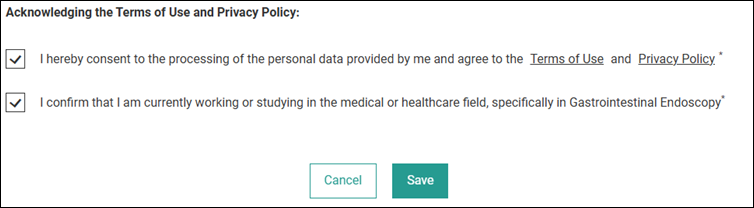
- Go to your ESGE Profile, log in using your existing ESGE credentials and ensure that you have completed all required fields in the profile and have accepted ESGE’s terms of use/privacy policy, as below. Click ‘Save’.
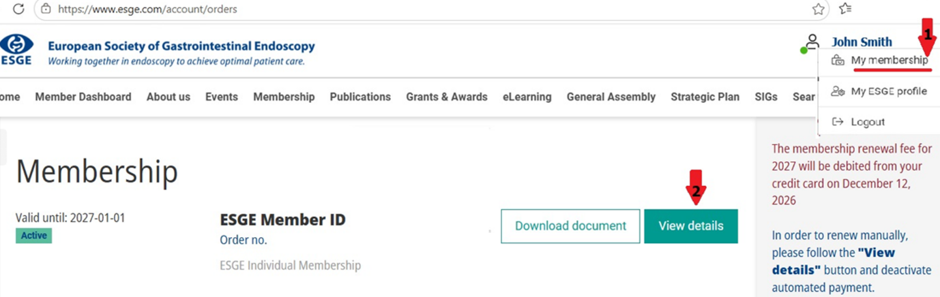
- Head to your ESGE Membership Overview (fig 1 below). If there is an existing active membership product listed there titled either ‘ESGE individual Membership’ (as below) or ‘ESGE Trainee Membership’, please click ‘View details’ (fig 2) and then click on ‘Cancel automatic payment’ (fig 3).

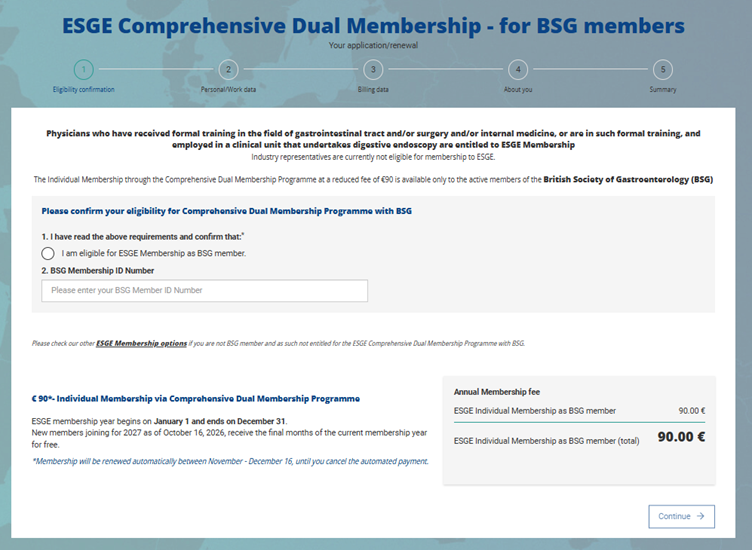
- Once your profile has been updated and any existing automated payments have been cancelled, please click on this link to renew your ESGE membership. If successful, you should see the form below!
If you continue to encounter issues once you’ve followed the steps outlined above, please reach out to [email protected] and they will help guide you through the renewal process.